Games Workshop and hobby (incomplete) stores map
Many people do pilgrimages to Apple stores when they travel. Others like to go shopping at a famous place. As for me, I tend to have a sixth sense for finding gaming stores, comic stores and official Games Workshop Stores whenever I travel (inside and outside of Spain) and maybe buy a miniature or two to remind me in the future of that trip.
This is more related to chance, so, a few months ago I decided to build a map with the official GW stores and other RPG, boardgames and miniature stores so that if I travel to one of the countries I have data for, I can directly see where I can find stores.
It is not full as the data I gathered was mostly from Europe and USA, but I'll probably try to add Asia and Australia whenever I have time, but anyway it can be handy even at current incomplete state.
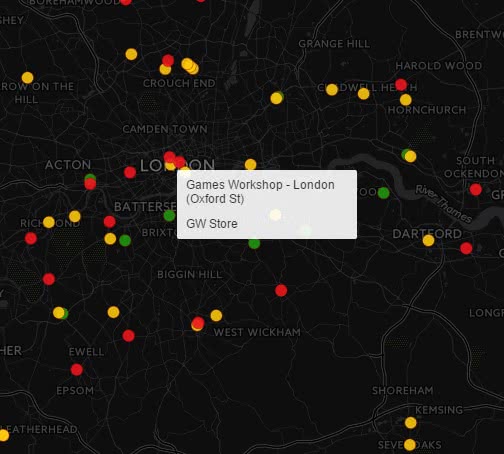
You can check the map here: //theelderthoughts.blogs.kartones.net/page/gw-stores-map. There's a button at the top left area to go fullscreen, and the map works in smartphones and tablets, although instead of moving the mouse over a point to see the name you must click/touch it.
Call of Cthulhu Roleplaying sessions starting soon!
Finally, and after so many years without playing a pen-and-paper RPG, this situation is coming to an end.
Some workmates and I are finishing preparations for some Call of Cthulhu roleplaying!
As some of us have not played in a long long time, and others are newcomers to RPGs, our master (keeper in the Cthulhu theme ;) has decided to start with basic rules and expand it as we progress.
To do so, we're using the following:
- GORE (Generic Old-school Role-playing Engine) as the basic ruleset, with some modifications and Cthulhu-specific tables.
- Call of Cthulhu Quickstart Rules, to provide Cthulhu settings and rules to the GORE system. It is a ultra-compact version of the standard roleplaying game.
- Byakhee + the Seet Back for Call of Cthulhu, for the character generation.
We know few more details... the game will be placed in 1922 in the north of Wisconsin.
Let's hope all goes well and we start having playing sessions each few weeks!
Final Fantasy X & X-2 Model viewer
The www from time to time surprises me as if I were just beginning to surf it. I've just found a Final Fantasy X & X-2 3D model and animation viewer!
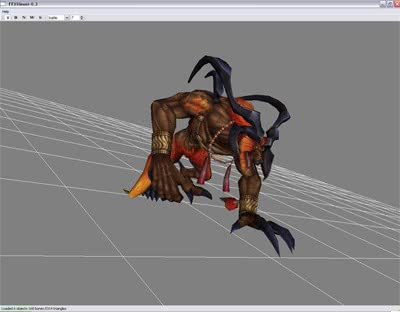
It's a bit complicated to use at first (lack of instructions...), but here are the basics:
- Create a ISO file of FFX and/or FFX-2 (I've tested FFX Eur and FFX-2 USA and works with both, so probably Jap will work too)
- Drag and drop the just created ISO into the ffxdumper.exe.
- It will start extracting lots of .FFB files into folders in the path c:\Documents and Settings\[your_user_name]\
- Move the folders wherever you want. Folder names are: mon - npc - obj - pc - sum - wep (FFX-2 hasn't got all of them)
- Drag the desired .FFB file into the ffxview.exe and the viewer will load it.
And that's all folks!
- ← Newer Articles Page 2 / 2 Older Articles →